Remember when editing a photo meant hours in Photoshop, clicking through fifty menus just to remove one ugly background? Those days are basically over. Now you can just type what you want — "remove the trash can," "make the sky sunset orange" — and the app does it in seconds.
That's the whole idea behind AI photo and video editors, and in 2026, they've quietly become one of the biggest trends in tech. Let's break down exactly what they are, how they work, and whether you actually need one.
What Is an AI Photo/Video Editor?
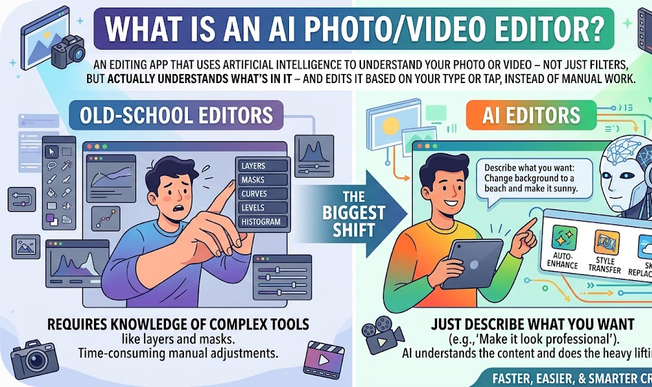
In simple words: it's an editing app that uses artificial intelligence to understand your photo or video — not just apply filters, but actually understand what's in it — and then edit it based on what you type or tap, instead of you doing everything manually.
Old-school editors need you to know tools like layers, masks, and curves. AI editors just need you to describe what you want. That's the biggest shift.
Why It Matters (Why This Trend Blew Up)
Three simple reasons:
- It saves insane amounts of time. A background removal that used to take 10 minutes of careful clicking now takes one tap.
- It removes the skill barrier. You don't need to be a designer to make something look professional anymore.
- Everyone needs visual content now. Bloggers, small business owners, students, social media creators — everyone posts photos and videos, and everyone wants them to look good, fast.
That combination — speed + no skill needed + everyone needs it — is exactly why this category exploded.
How It Actually Works (Simple Breakdown)
You don't need to understand the tech to use these apps, but here's the short version:
- The AI "looks" at your image using something called computer vision — this lets it tell the difference between a person, a background, an object, or the sky.
- It uses generative AI to actually create new pixels when needed — like filling in a background you erased, or extending a photo's edges (this is often called "outpainting" or "generative fill").
- You give it instructions in plain language, and it maps your words to an editing action.
Think of it like having a very fast, very obedient assistant who never gets tired of small edits.
Real Examples You've Probably Heard Of
- Adobe Photoshop now runs on Adobe's Firefly generative AI, letting users remove objects, expand images, and blend edits with just a prompt — while still keeping full manual control for professionals.
- Canva's Magic Studio brought AI editing to non-designers with one-click tools for erasing objects, expanding image borders, and generating new visuals — popular with bloggers and social media managers.
- Apple's Pixelmator Pro was folded into a new Creator Studio subscription, bringing Apple Intelligence directly into photo editing for Apple users.
- Dedicated mobile apps focused purely on quick fixes — sharpening blurry photos, restoring old pictures, or removing scratches automatically — have also become extremely popular for casual, everyday use.
Advantages (Fayde)
- Beginner-friendly — no design degree required.
- Massive time saver — edits that took hours now take minutes.
- Affordable — many tools have solid free tiers, with paid plans often starting around $10–15/month.
- All-in-one — modern tools combine photo editing, video editing, and content generation in a single app.
- Constantly improving — because it's AI-powered, the results genuinely get better over time as models improve.
Disadvantages (Nuqsanaat)
- Less fine control — AI tools are great for quick edits, but professionals doing detailed, precise work often still need traditional tools with manual layers and masks.
- Learning curve for advanced features — ironically, some "prompt-based" tools require you to learn how to write good prompts to get good results.
- Not fully reliable for RAW/professional photography — some AI-first tools aren't built for high-end photography workflows.
- Can look "fake" if overused — AI-generated fills and expansions can sometimes look unnatural if you push them too far.
- Privacy concerns — since many tools process your images on cloud servers, it's worth checking a tool's privacy policy before uploading personal or sensitive photos.
Common Mistakes Beginners Make
- Using AI edits for everything instead of learning basic manual skills too — a mix of both works best.
- Not reading what a "free tier" actually includes (many limit how many AI credits or edits you get per month).
- Assuming every AI editor works the same way — some are prompt-based, others are click-based, and they aren't interchangeable.
- Ignoring resolution/export settings — a common issue where the edited version ends up lower quality than the original.
Frequently Asked Questions
Is AI photo editing free? Most tools offer a free version, but with limited AI credits or watermarks. Paid plans usually start somewhere around $10–15 a month.
Do I need any editing skills to use these apps? No — that's the whole point. Most are designed so complete beginners can get professional-looking results.
Can AI video editors fully replace a human editor? Not yet, especially for branding-heavy, large-scale, or highly creative projects. They're best seen as a massive time-saver, not a full replacement for professional editing skill.
Which is better — Photoshop or Canva for AI editing? Photoshop is built for professionals needing precise control. Canva is built for beginners and non-designers who want fast, simple results. Neither is "better" — they solve different problems.
Is my data safe when I use these apps? It depends on the app. Since your images are typically processed on the company's servers, always check the app's privacy policy, especially before editing sensitive or personal photos.
Final Thoughts
AI photo and video editors aren't replacing creativity — they're removing the boring, technical barrier that used to sit between an idea and a finished image. Whether you're a blogger needing quick graphics, a small business owner making product photos pop, or just someone who wants old family photos restored, there's an AI tool built for exactly that job now.
The real skill in 2026 isn't "how to use Photoshop" anymore — it's knowing which tool fits which job.