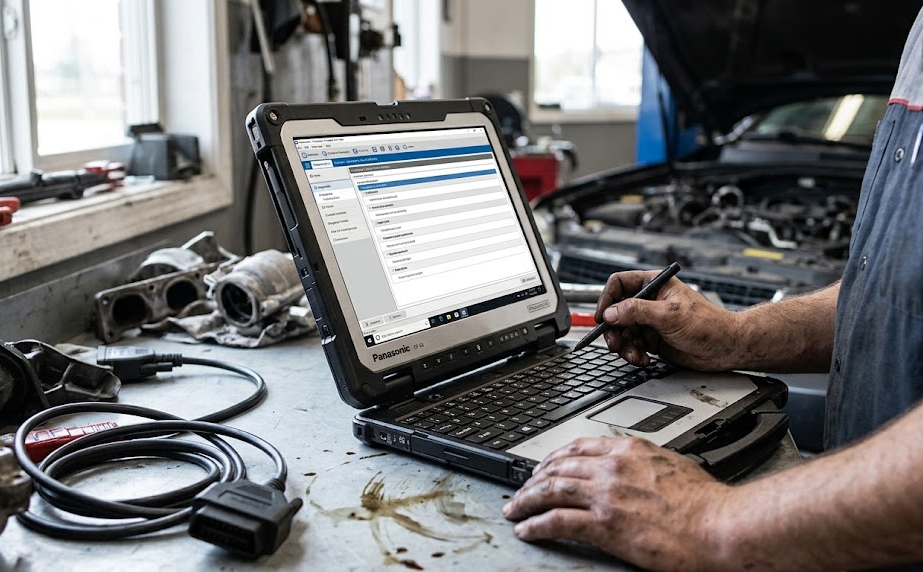
The Panasonic Toughbook CF-33 Mk4 16GB 512GB SSD OPAL is not a typical business laptop. It is a fully rugged 2-in-1 computer designed for people who may need to work around dust, rain, drops, vehicles, industrial equipment, or other demanding conditions.
The combination of 16GB RAM, a 512GB OPAL NVMe SSD, Windows 11 Pro, a 13th-generation Intel Core processor, and a bright 12-inch touchscreen gives it a practical mix of computing power, security, and durability. Panasonic lists this configuration as the standard CF-33mk4 model.
Panasonic Toughbook CF-33 Mk4 specifications at a glance
Specifications can vary by regional model and configuration, so the exact unit should always be checked before purchase.
What exactly is the Panasonic Toughbook CF-33 Mk4?
The TOUGHBOOK 33 Mk4 is a detachable 2-in-1 computer. In simple terms, it can work as a Windows tablet or connect to its keyboard base and behave more like a conventional laptop.
The Mk4 uses an Intel Core i5-1345U vPro processor as its listed standard processor, with an Intel Core i7-1370P available as an option. Panasonic specifies 16GB of onboard memory, with 32GB available as an option, and a 512GB OPAL NVMe SSD in the configuration discussed here.
The display is one of its defining features. It is a 12-inch 2160 × 1440 QHD touchscreen with brightness of up to 1,200 cd/m². It is also designed for glove operation and includes a digitizer, which makes it more suitable for outdoor and field work than an ordinary laptop screen.
The important part is that Panasonic didn't design the CF-33 simply to look rugged. The machine is built around protection and field usability. Panasonic lists MIL-STD-810H testing and an IP65 rugged rating for the Mk4 on its current product information.
Why does a laptop like this even exist?
A normal laptop is perfectly fine for an office desk. Put that same laptop in a service truck, construction site, emergency vehicle, factory floor, or outdoor maintenance environment and the story changes.
Dust gets into equipment. Screens become difficult to read in sunlight. Workers may have gloves on. A laptop can be knocked off a vehicle seat or workbench. Ports and connectors also become much more important when technicians need specialized equipment.
That's the problem the Toughbook 33 is trying to solve.
Panasonic specifically positions the CF-33 for mobile professionals and offers configurable features such as barcode readers, serial connections, smart-card readers, fingerprint readers, GPS, and cellular connectivity.
This is why the CF-33 makes more sense for a field technician than for someone who simply wants a laptop for watching YouTube or writing documents at home.
What does “16GB 512GB SSD OPAL” actually mean?
The long product name can make this machine sound more complicated than it is.
16GB refers to the system memory, or RAM. RAM is the computer's short-term workspace. More RAM allows Windows and multiple applications to keep more information readily available while you're working.
The CF-33 Mk4 uses 16GB of onboard LPDDR4x memory, with Panasonic listing 32GB as an optional configuration.
512GB SSD refers to the internal storage. An SSD is where Windows, applications, documents, photographs, and other files are stored. Because it is solid-state storage, there are no traditional spinning hard-disk platters.
Then there is OPAL.
This is the interesting part.
OPAL refers to a security specification from the Trusted Computing Group (TCG) for storage devices. An OPAL-compatible drive can provide hardware-based storage security features, including locking and encryption capabilities. The TCG's current Opal specification is designed for client and enterprise storage security.
Think of an ordinary storage drive as a filing cabinet. OPAL adds a security system to that cabinet at the drive level. It can help protect stored information even when the storage device itself is removed from the computer.
That doesn't mean every OPAL feature is automatically configured just because the specification appears in the product description. Security settings still need to be properly deployed and managed.
How the Toughbook 33 Mk4 works in everyday use
The machine's design becomes easier to understand if you break the experience into a few simple steps.
1. Start it like a Windows PC
The CF-33 Mk4 runs Windows 11 Pro, so the basic software experience is familiar to anyone who has used a modern Windows computer. Panasonic also lists TPM 2.0-compliant security and other security features in its specifications.
2. Use it as a tablet
Remove or detach the keyboard and the main computer becomes a tablet.
This is useful when you're standing beside machinery or sitting inside a vehicle. You don't always have a desk available, and the built-in handle and rugged construction are intended for mobile work.
3. Use the touchscreen
The 12-inch display supports touch and digitizer input. Panasonic specifies glove-enabled capacitive touch, which matters when workers don't want to remove protective gloves simply to operate the computer.
4. Attach the keyboard when you need more traditional PC control
The detachable keyboard turns the system into a more conventional 2-in-1 computer.
The keyboard configuration also adds useful connections, including USB ports, SDXC, HDMI, VGA, Ethernet, and a serial interface, depending on the configuration.
5. Store work locally on the SSD
The 512GB OPAL NVMe SSD provides the local storage for Windows, programs, and files.
The “NVMe” part describes a modern storage interface designed for fast solid-state storage. The more unusual part here is OPAL, which adds storage-security capabilities when properly configured.
6. Use wireless or wired connectivity
The Mk4 supports Wi-Fi 6E and Bluetooth 5.3. Panasonic also lists optional 4G and 5G cellular connectivity, depending on configuration.
That makes the machine much more useful for workers who cannot depend on a normal office Wi-Fi network.
A real-world example: the field technician
Imagine a technician servicing industrial equipment.
They arrive at a site carrying the CF-33. Instead of finding a clean desk and plugging in a standard laptop, they may be working beside a machine with limited space.
The technician can hold the Toughbook as a tablet, use the touchscreen, connect through Ethernet or another available interface, and access service documentation or diagnostic software.
If the job moves outdoors, the bright display becomes useful. If gloves are required, glove-enabled touch is more practical than a normal consumer touchscreen.
Panasonic itself highlights field deployments of the TOUGHBOOK 33, including mobile service teams at Kärcher and frontline response work with Greater Manchester Fire & Rescue.
This is where the CF-33 starts to make sense. Its value isn't simply that it has 16GB of RAM. The value comes from putting computing, connectivity, touch input, and rugged protection into one field-oriented device.
The biggest advantages of the CF-33 Mk4
Rugged construction
The strongest reason to consider the CF-33 is durability.
Panasonic lists MIL-STD-810H testing and an IP65 rating for the Mk4. The specifications also list resistance to drops and operation across demanding environmental conditions.
That is a very different design priority from a thin consumer notebook.
Bright outdoor display
The 12-inch QHD display can reach up to 1,200 cd/m², according to Panasonic. That's a particularly useful specification for field workers who may have to read information outside.
A bright display doesn't magically make every outdoor situation perfect, but it addresses one of the common weaknesses of ordinary laptops.
Flexible 2-in-1 design
The detachable format gives the CF-33 two useful personalities.
Use it as a tablet when mobility matters. Add the keyboard when typing, ports, or a more traditional workstation setup is needed.
Useful business connectivity
This isn't a laptop built around only USB-C.
Depending on configuration, the CF-33 family offers interfaces such as Ethernet, HDMI, VGA, serial connectivity, USB-A, Thunderbolt 4, SD storage, and docking connections. Some features are optional, so buyers need to check the exact configuration before ordering.
For industrial and service environments, that's a major advantage.
OPAL storage security
The 512GB OPAL SSD is particularly interesting for organizations handling sensitive information.
TCG's Opal specification defines mechanisms for controlling access to storage and protecting data stored on compatible drives.
This is useful for mobile computers because the physical machine may travel through many locations.
Replaceable battery approach
Panasonic uses two batteries in the CF-33 design and supports hot swapping. Standard and larger-capacity battery options are available depending on configuration. Panasonic's published MobileMark 25 figures are approximately 7 hours for the tablet and 6.5 hours with the keyboard using standard batteries, while optional large batteries are rated at approximately 14.5 and 14 hours, respectively.
Real battery life will vary with workload, brightness, connectivity, and configuration.
Where the CF-33 Mk4 falls short
The same features that make the Toughbook impressive also create some compromises.
It's heavy compared with ordinary laptops
The rugged design requires more physical material than a thin consumer notebook.
Panasonic lists the tablet at around 1.55 kg with standard batteries, while the tablet and keyboard together are about 2.81 kg in the referenced Mk4 specification.
That's manageable for field work, but it isn't something you'd choose because it's lightweight.
It's bulky
The CF-33 is designed to survive demanding environments, not to disappear into a slim laptop bag.
Its thickness and rugged housing are part of the package. If your work happens entirely at a desk, that bulk may feel unnecessary.
The hardware isn't aimed at gaming
The standard Mk4 configuration uses an Intel Core i5-1345U with integrated Intel graphics. Panasonic also offers the Core i7-1370P option, but this is still a business and field computer rather than a gaming machine with a dedicated high-end GPU.
For office applications, field software, diagnostics, communications, and general professional workloads, its hardware makes much more sense.
Optional features can make buying confusing
This is one area where buyers need to pay attention.
Panasonic offers several configurable features, including cellular connectivity, GPS, serial interfaces, barcode readers, smart-card readers, fingerprint readers, and different battery options. Not every CF-33 Mk4 has the same collection of features.
Two machines can both be called “CF-33 Mk4” while having different configurations.
Common mistakes buyers make
The first mistake is assuming every CF-33 Mk4 includes every optional feature.
It doesn't. Always check the exact model or configuration code before purchasing.
The second mistake is treating OPAL as a magic security switch. OPAL is a storage-security standard. Its security capabilities depend on the drive and how those capabilities are configured and managed. The Trusted Computing Group documentation describes processes such as taking ownership, activating the locking subsystem, configuring locking ranges, and authentication.
The third mistake is buying it for ordinary home use without considering the size and weight.
If you're sitting at a desk all day, a conventional business laptop will usually be easier to carry.
The fourth mistake is confusing ruggedness with indestructibility.
MIL-STD testing and an IP rating are useful indicators of environmental durability, but they don't mean the machine can survive every possible accident. Panasonic's own documentation describes specific test conditions and notes that results can vary by model and option.
The fifth mistake is ignoring the keyboard configuration.
The tablet itself and the complete 2-in-1 system don't have exactly the same ports, weight, or dimensions. If you need VGA, additional USB connections, Ethernet, or other keyboard-mounted interfaces, check the configuration carefully.
Who should buy the Panasonic Toughbook CF-33 Mk4 16GB 512GB SSD OPAL?
This configuration makes the most sense for people whose computer has to go where ordinary laptops shouldn't.
Good matches include:
- Field service technicians
- Utility and infrastructure workers
- Emergency-response teams
- Industrial maintenance staff
- Vehicle-based workers
- Engineers working at remote sites
- Organizations handling sensitive mobile data
- Businesses that need legacy ports or specialized peripherals
It's less compelling for someone who mainly wants a lightweight laptop for school, browsing, streaming, or casual office work.
That's the key distinction. You're paying for the rugged platform and field flexibility, not simply for the processor and RAM.
Frequently asked questions
Is the Panasonic Toughbook CF-33 Mk4 a good laptop?
Yes, if your priority is rugged field use rather than portability. It combines Windows 11 Pro, a 13th-generation Intel processor, 16GB RAM, fast NVMe storage, a bright touchscreen, extensive connectivity, and rugged protection. For normal home use, however, its size and weight may be unnecessary.
What does OPAL mean on the 512GB SSD?
OPAL refers to the Trusted Computing Group's storage-security specification. Compatible OPAL drives can provide hardware-level security functions such as storage locking and encryption. The exact security behavior depends on the drive and how it is configured.
Is the CF-33 Mk4 waterproof?
It is better to describe it as water-resistant and rugged, not waterproof. Panasonic lists an IP65 rating for the current Mk4 product information and specifies testing against particular environmental conditions. That does not mean it should be deliberately submerged.
Can the Toughbook CF-33 Mk4 be used as a tablet?
Yes. The CF-33 is designed as a detachable 2-in-1, so the tablet can be separated from its keyboard base. The touchscreen and digitizer are central parts of the design.
Does every CF-33 Mk4 have 4G or 5G?
No. Cellular connectivity is configuration dependent. Panasonic lists optional 4G and 5G capabilities for the Mk4, so buyers should verify that the specific unit they're purchasing includes the required modem.
Final takeaway
The Panasonic Toughbook CF-33 Mk4 16GB 512GB SSD OPAL is a specialized computer, and that's exactly why it stands out.
Its 16GB RAM and 512GB NVMe SSD make it a capable Windows workstation, but those aren't the real story. The real attraction is the combination of rugged construction, a bright glove-friendly touchscreen, detachable design, extensive connectivity, replaceable battery options, and OPAL-capable storage security.
For someone working in an office, it's probably more machine than necessary. For a technician standing beside a vehicle or industrial machine in difficult conditions, those same characteristics can be the reason a conventional laptop simply isn't the right tool.
Suggested internal linking topics
- Best rugged laptops for field technicians
- Panasonic Toughbook buying guide
- Toughbook vs. standard business laptops
- What is a self-encrypting SSD?
- Windows 11 Pro security features for business laptops
Suggested external authority sources
For publication, the strongest external references are Panasonic's official TOUGHBOOK 33 Mk4 specification/product documentation and the Trusted Computing Group's official TCG Opal specification. Panasonic provides the hardware and durability specifications, while TCG provides the authoritative technical definition of OPAL storage security.
Facts to double-check before publishing
- Exact IP rating: Panasonic's regional/current pages list IP65 for the Mk4, while some older or regional documentation may show different wording. Use the specification for the exact market/model you're listing.
- Processor: Confirm whether the specific retail unit contains the standard Core i5-1345U or optional Core i7-1370P.
- Cellular connectivity: Confirm whether the particular unit includes 4G, 5G, or neither.
- Battery configuration: Standard and large batteries have different published battery-life figures.
- Ports and expansion modules: Serial, barcode, smart-card, fingerprint, GPS, and other features can be configuration dependent.
- OPAL implementation: Confirm the exact SSD's OPAL support and whether its security features are already configured on the particular unit. OPAL capability alone does not prove that a specific security policy has been activated.