Picture this: your hands are full of grocery bags, and instead of fumbling for keys or punching in a code, you just walk up to your door. A camera or fingerprint sensor picks you out, checks who you are, and the lock pops open on its own. Sounds like sci-fi, right? Turns out it's already sitting on store shelves, tucked inside a growing wave of smart locks.
Here's the thing though — "AI door lock" isn't really a fixed category with a clear definition. Different companies slap that label on very different products. One brand might mean a fingerprint sensor that gets smarter over time. Another might mean a camera that recognizes faces or flags suspicious visitors. There's no single agreed-upon standard behind the term.
So what actually separates an "AI" lock from a regular smart lock? Does the AI part even make your home safer? Let's break it down before you assume the fancy label means fancy protection.
What Is an AI Door Lock, Really?
At its core, an AI door lock is just an electronic lock that adds some form of automated recognition or decision-making on top of the usual smart-lock features. Depending on the brand, that might include fingerprint scanning, facial recognition, phone-based unlocking, pattern learning, built-in cameras, or automated alerts.
Most smart locks already let you unlock with your phone, a PIN, an NFC card, Bluetooth, or a fingerprint — nothing new there. What changes with "AI" is usually the software behind the scenes: it studies biometric or sensor data and tries to get better at recognizing you, or it makes some kind of judgment call based on what it sees.
Take Lockly's Vision Zeno, for instance. It uses a 3D fingerprint sensor paired with learning software that's supposed to get faster and more accurate the more you use it. That's a genuinely specific application of AI — a step up from a company just calling their lock "smart" and hoping the word "AI" sticks.
Worth remembering: not every lock with a fingerprint sensor deserves the AI label, and plenty of locks marketed as "AI-powered" are using the term pretty loosely.
So How Does One Actually Work?
The marketing copy makes this sound complicated. It really isn't.
When you try to get in, the lock first grabs some kind of credential from you — a fingerprint, a face scan, a PIN, your phone, an NFC key, whatever method it supports.
It then checks that against what it already knows. Match found? The motor inside kicks the bolt or latch open.
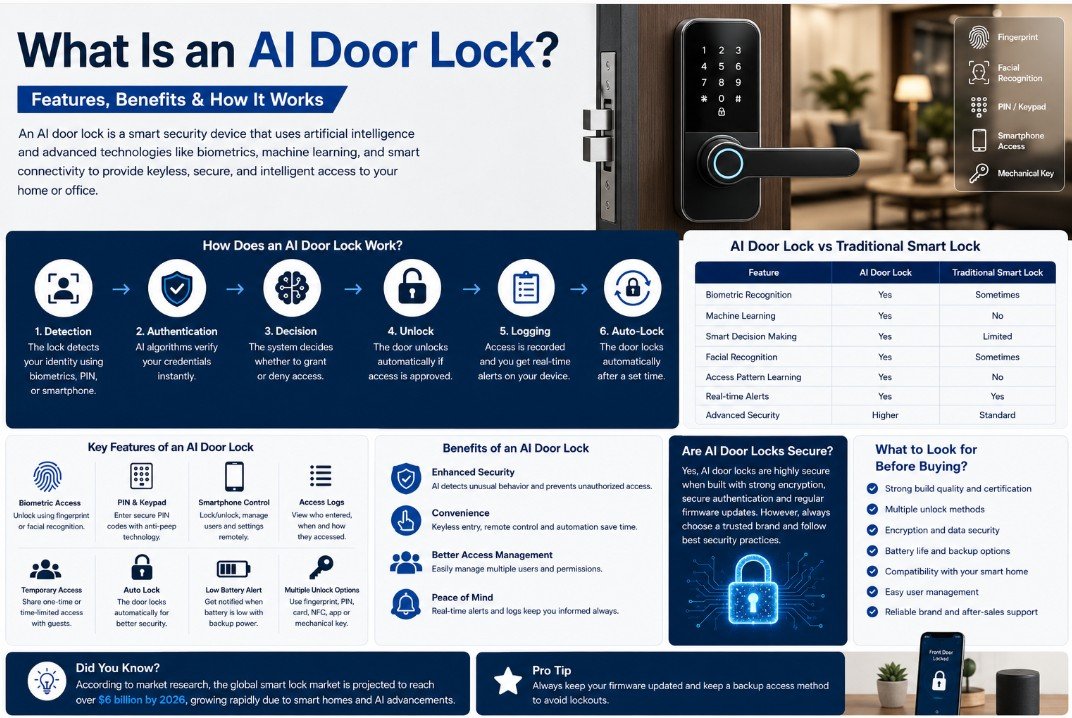
Roughly, here's what happens:
- Detection — a sensor, camera, keypad, or your phone signals that someone's trying to get in.
- Authentication — the lock compares what you presented against its stored records.
- Decision — the electronics decide whether you're allowed through.
- Actuation — a small motor physically moves the bolt.
- Logging — some locks note the event, either on-device or in an app.
- Re-locking — if auto-lock is turned on, the door secures itself again after a bit.
Where does the "AI" actually live in all this? Usually in step 2 — the recognition part — not in the mechanism that swings the bolt. Some machine-learning models help the fingerprint sensor still recognize you even when your finger's a little dirty, wet, or angled differently than usual.
That's an important distinction to hold onto: the smarts and the physical security are two separate things. A brilliant recognition algorithm won't save you if the lock body is flimsy, the installation is sloppy, or the software has holes in it.
What Features Actually Show Up in These Locks?
Every manufacturer packages things a little differently, but a handful of features keep showing up across the board.
Fingerprint and Facial Recognition
Fingerprint scanning is probably the most common biometric option out there. No password to remember — just press your finger and go.
Some newer models throw machine learning into the mix, claiming it helps the sensor adapt over time. Lockly makes this exact claim about their 3D fingerprint sensor.
Facial recognition is the other route some brands take. A camera captures your face and compares it against what's stored.
One caveat worth flagging: not all facial-recognition locks are built the same. Sensor quality, how well it resists someone holding up a photo to trick it, where the processing happens, how it handles bad lighting — all of that varies wildly from one product to the next.
Good Old PIN Entry
A keypad still earns its place, honestly, because biometrics don't always cooperate — cold weather, wet fingers, a scratch on your thumb, you name it.
Lockly's Pin Genie feature is a clever touch here — it shuffles the keypad numbers around each time, so someone watching over your shoulder can't easily figure out your code by memorizing where your finger went.
For bigger households, a shared PIN is often just simpler than registering everyone's fingerprint or face individually.
Controlling It From Your Phone
Most connected locks pair with an app, and depending on the model, you can typically:
- Lock and unlock remotely
- Add or remove people who have access
- Hand out temporary codes
- Check who's been coming and going
- Get alerts
- See whether the door's locked right now
- Tweak settings
How much of that actually works well depends heavily on the ecosystem — whether the lock talks over Bluetooth only, needs Wi-Fi, requires a separate hub, and so on.
Access History
For families, landlords, or small offices, being able to glance back and see who came in and when is genuinely handy.
No more wondering whether your teenager actually got home, or whether the dog walker showed up.
That said, don't treat the log as gospel. How reliable it is — timestamps, how far back it goes, whether it syncs properly — depends entirely on the product.
Temporary Codes for Guests
This is one of the more underrated perks of going digital. Instead of cutting a spare key for the cleaner or your visiting in-laws, you can just generate a code that expires whenever you want.
Some locks, like Lockly's, even support one-time or limited-use codes that work offline — useful if the lock loses its internet connection.
Compare that to the old routine of making physical key copies for every person who occasionally needs to get in. Not even close.
Locking Itself Automatically
Most of these locks can be set to relock either after the door shuts or after a set number of minutes.
It solves a genuinely annoying, very human problem — that nagging feeling halfway to work where you're not sure if you locked the door.
Just be careful with this setting. If your latch or deadbolt isn't perfectly aligned, auto-locking can cause the mechanism to jam or bind — no amount of clever software fixes a mechanical alignment problem.
What Happens When the Battery Dies
Here's a fair question anyone should ask before buying: what happens when the battery finally gives out?
Decent products build in a backup plan — a physical key slot, an external power port, a swap-in battery, something.
The ORVIBO C1, for example, includes a USB-C emergency power port on top of its fingerprint, password, card, app, NFC, and physical key options.
This is genuinely worth checking before you buy. You don't want a lock that leaves you completely stuck if one system fails.
AI Lock vs. Regular Smart Lock — What's the Real Difference?
Honestly, the line between these two gets blurry fast, and that's part of why the marketing confuses people.
A standard smart lock mostly focuses on connectivity — unlocking via phone, PIN, Bluetooth, or a smart-home hub.
An AI-branded lock usually builds on that foundation with some layer of automated recognition or learning.
Notice all the "sometimes" and "may include" language in that table? That's not an accident — there's no strict checklist that automatically qualifies a lock as "AI."
Why Would You Actually Want One?
The real selling point isn't that AI makes your door bulletproof. It's the mix of convenience, control, and automation that adds up.
Fewer Daily Hassles
No more digging for keys. Your fingerprint, phone, face, or a PIN gets you in instead.
If several people come and go from your house regularly, this cuts out a lot of small daily friction.
Managing Who Gets In Is Simpler
Revoking a digital code takes seconds. Getting a physical key back from someone? Not always so easy.
Give a guest temporary access, then just let it expire — no awkward "can I have my key back" conversation needed.
You Actually Know What's Happening at Your Door
Access logs won't replace a security camera, but they give you another layer of visibility you wouldn't otherwise have.
It Plays Nice With Your Smart Home
This is where Matter comes into play — an open smart-home standard that uses Bluetooth for setup and then Wi-Fi, Thread, or Ethernet to keep devices talking to each other, according to the Connectivity Standards Alliance.
A Matter-certified lock, like the Level Lock Pro listed in the CSA's certification database, means less risk of getting locked into one company's closed ecosystem.
Less Reliance on Metal Keys
A digital credential can be changed or revoked instantly — something a cut metal key just can't do.
That doesn't mean physical keys are pointless, though. A solid mechanical backup is honestly one of the more valuable features a smart lock can have.
Does AI Actually Make These Locks Safer?
This is where you need to slow down and read past the marketing.
AI doesn't automatically translate to better security. Full stop.
A lock's real-world security depends on a lot more than how clever its recognition software is. The physical build, how authentication is handled, the security of the app and cloud backend, firmware quality, and even how it's installed — all of that matters just as much, if not more.
NIST's IoT security guidance points to things like data protection, controlling logical access, secure update mechanisms, and general cybersecurity awareness as the real markers of a well-built connected device.
That's a genuinely useful lens to view any AI lock through. A great fingerprint sensor means nothing if the app behind it has weak login security or the manufacturer stopped pushing firmware updates two years ago.
There's also been real research uncovering vulnerabilities in smart locks and the biometric systems they rely on — a good reminder that these devices deserve the same scrutiny as any other connected gadget in your home.
What Could Go Wrong?
Convenience always comes with a trade-off, and here's where it shows up.
Dead Batteries
Unlike a plain mechanical deadbolt, these locks run on electronics — which means batteries, which means they eventually die.
Don't ignore that low-battery notification. Treat it like a real warning, not a suggestion.
Security Holes
Connecting a lock to the internet opens up a new way for things to go wrong.
NIST's 2026 IoT guidance is pretty direct about this: manufacturers need to bake security in from the start and give customers what they need to keep the device secure over its entire lifespan.
Before buying, it's worth checking whether the company actually has a track record of pushing out security patches — not just at launch, but years down the line.
Privacy Trade-offs
Locks with cameras or facial recognition are collecting sensitive data about you, plain and simple.
Before you buy one, it's worth digging into:
- What data gets collected
- Where it's stored
- Whether processing happens on the device or in the cloud
- How long they keep it
- Whether you can delete it
- What the app itself collects
- How the company's handled security issues in the past
When the Internet Drops
If a lock leans on Wi-Fi or cloud features, losing your internet connection can knock some functions offline.
That usually doesn't mean the physical lock stops working entirely — most keep a local backup method — but exactly how much still works varies from model to model.
This is exactly why a good AI lock should give you more than one way to get through the door.
What Should You Actually Check Before Buying One?
Don't get seduced by the word "AI" on the box. Start with your actual door.
- Does it even fit? Check your door's thickness, backset, and existing hardware before anything else.
- What unlock methods do you actually need? Not every feature matters to every household.
- Is there a real backup entry method? You'll want one eventually.
- How's the battery life? And how clear are the low-battery warnings?
- What's the connectivity setup? Bluetooth-only, Wi-Fi, Thread — each has trade-offs.
- Does it work with what you already use? Apple Home, Google Home, Alexa, SmartThings — check, don't assume.
- Is it actually Matter-certified? Not just labeled "smart home compatible."
- Can firmware be updated securely? And does the company actually do it regularly?
- What happens to your data? Especially with biometric or camera-based models.
- Is the hardware itself solid? No software feature fixes a badly built lock body.
NIST specifically calls out secure software updates — and the ability to verify those updates actually come from the real manufacturer — as a key thing to look for in any connected device.
Who's This Actually For?
An AI-enabled lock earns its price tag if you'll genuinely use what it offers. That tends to be:
- Bigger families with multiple people coming and going
- Anyone who regularly has guests or service providers over
- Owners of rental or vacation properties
- Small offices
- People who already have a smart-home setup going
- Anyone just tired of carrying keys
If you just want a reliable lock and rarely need remote access, guest codes, or biometric entry, you might be paying extra for features you'll never touch.
Bottom Line
Think of an "AI door lock" as an evolved smart lock, not some entirely new category of hardware. The "AI" part might mean biometric recognition, machine learning, facial analysis, smarter monitoring — but exactly what it means changes from brand to brand.
The features that actually matter day to day are the practical ones: getting in without a key, handing out temporary access, checking who came and went, auto-locking, controlling things from your phone, and playing well with the rest of your smart home.
The biggest mistake you can make is assuming "AI" on the box automatically means better security. Look at the whole picture instead — the lock body, how it authenticates you, its connectivity, what happens to your data, whether the firmware gets updated, and whether the company backing it actually takes security seriously.
Standards like Matter are making it easier for these locks to fit into a broader smart home setup. But at the end of the day, the smartest purchase is the one that actually fits your door and your life — not the one with the shiniest AI sticker on the box.